Live table tracking for restaurants
Every table, seen.
DineLens watches your dining room through the CCTV cameras you already have, and tells your manager the moment a guest is waiting, a table needs clearing, or a shift is short.
The problem
The costliest moments happen where no one is looking.
Guests nobody greeted
A party sits down mid-rush. Their server was in the kitchen and never saw them arrive.
Tables waiting to be cleared
Guests leave, plates stay. The host quotes a wait while a free table sits dirty at the back.
Rotas built on gut feel
Shifts follow last season’s habit, not when the room actually fills.
After five minutes with no visit, the manager knows. On every table, all night.
Five minutes is the default greet limit. Each restaurant sets its own, and its own limit for clearing tables. A table turns amber a minute before, so the team can get there first.
How it works
Three pieces, one of which you already own.
Your cameras
The CCTV or IP cameras already on your ceiling. Any camera with an RTSP stream works; ONVIF cameras are found on the network for you.
The DineLens box
One Windows PC in the restaurant watches the feeds and turns them into table events: seated, greeted, left, cleared.
Your team sees it
A live floor plan and alerts, with a sound, on any phone, tablet or PC on the restaurant Wi-Fi. Plus a weekly staffing report.
See it in action
Watch DineLens run a dinner service.
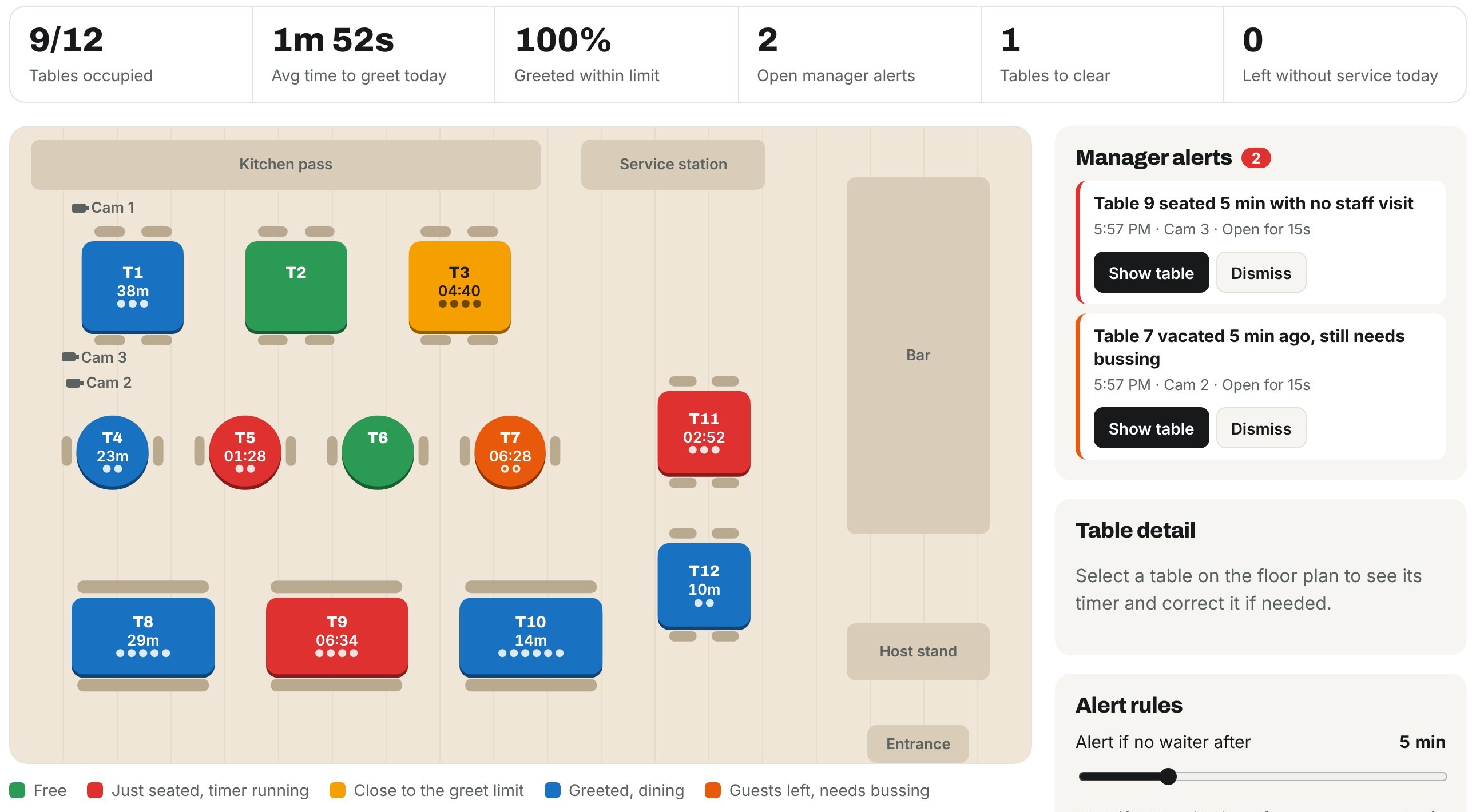
Live floor, DineLens demo restaurant.
Manager alerts
Four alerts, each one a guest you can still win back.
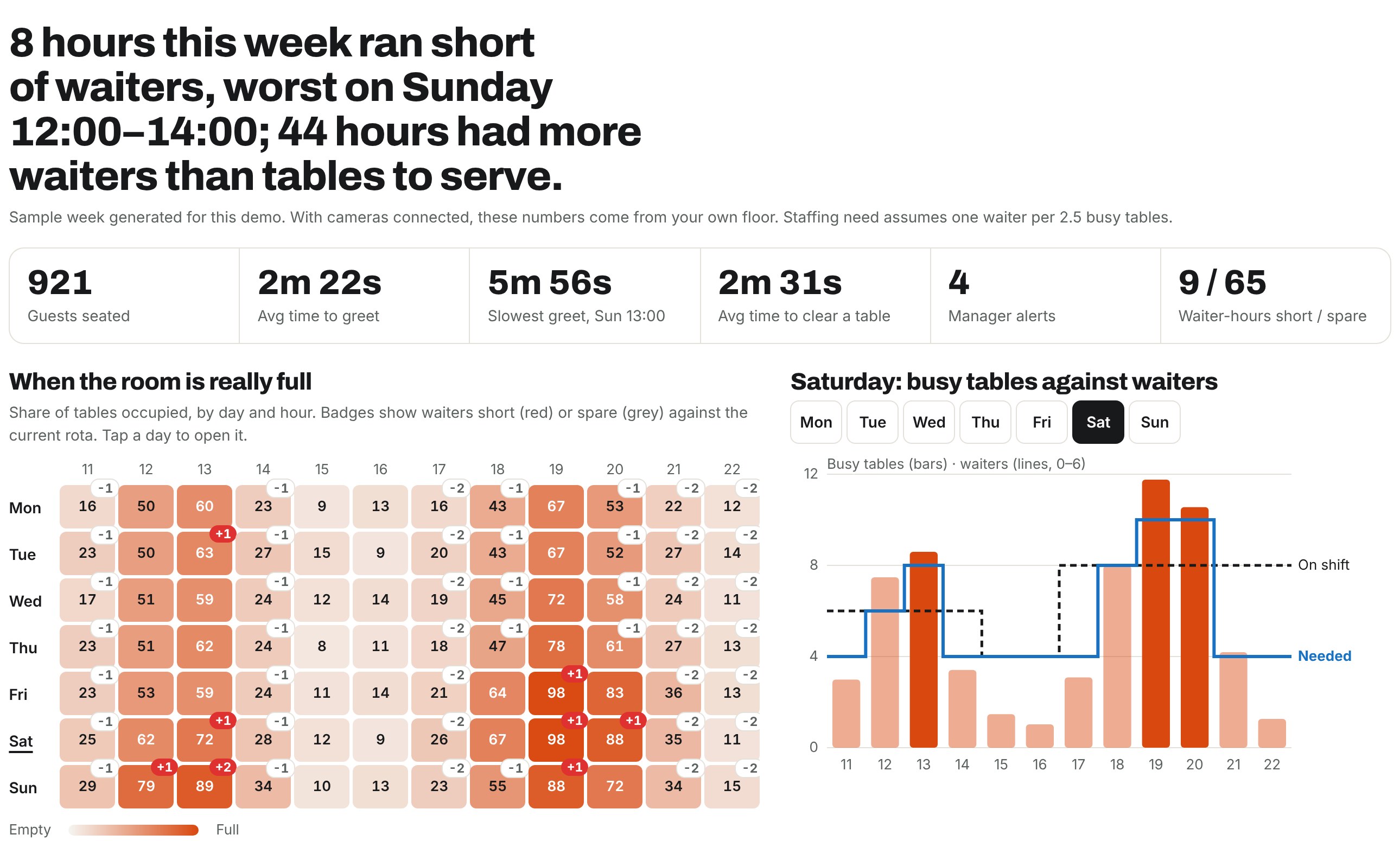
Weekly report, DineLens demo with a generated sample week.
Weekly staffing report
See when the room really fills, then staff for it.
- Peak hours, measuredHour by hour, how full the room actually was, from the cameras.
- Waiters against tablesWhere the rota ran short, and where people stood idle.
- Rota changes for next weekSpecific, by the hour: add two at 7 pm Saturday, drop one at 3 pm Tuesday.
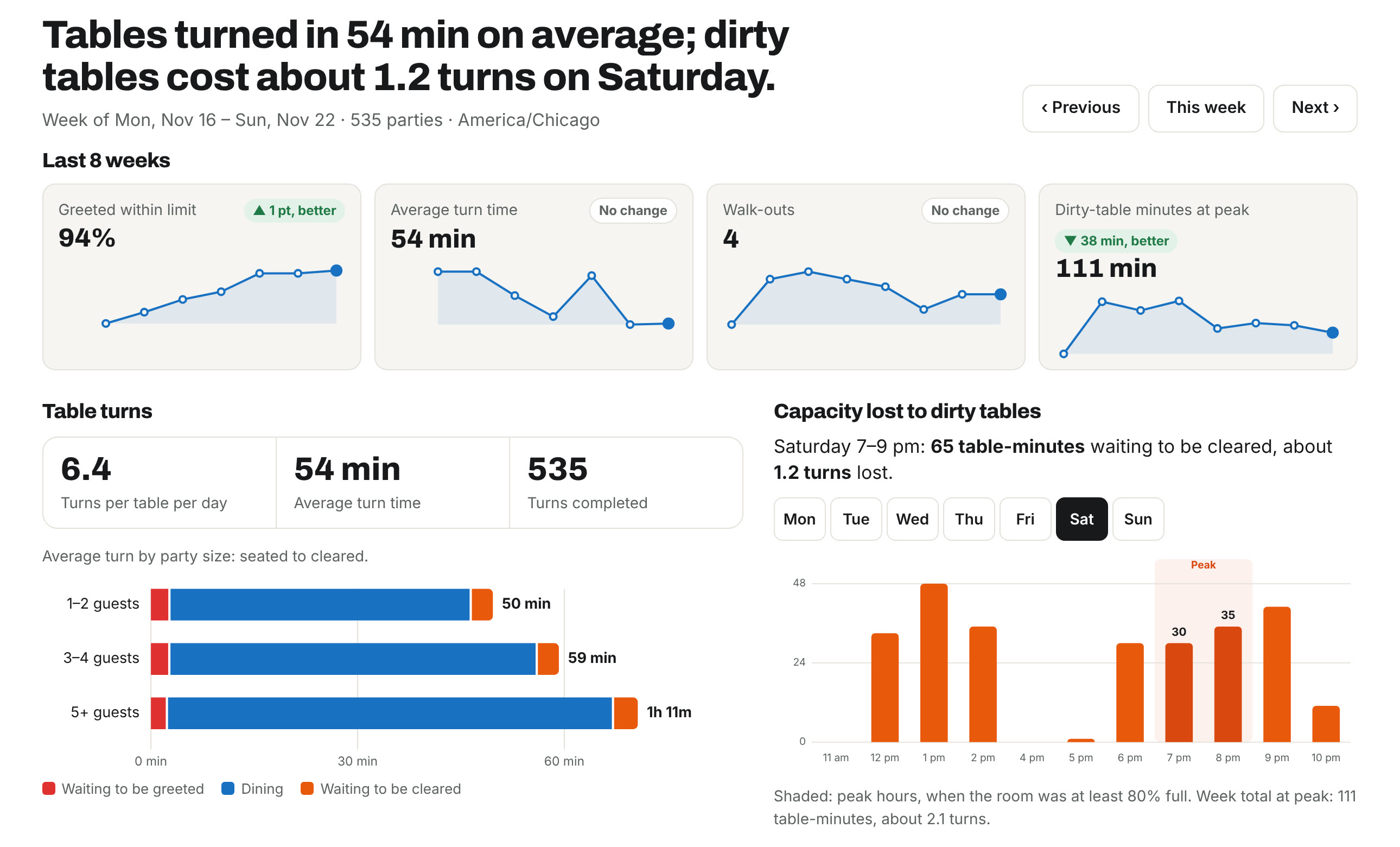
Service tab, DineLens demo restaurant with eight weeks of simulated service.
Service KPIs
Every week, the numbers behind a good service.
- Table turnsTurns per table, and where each turn's minutes went: waiting to be greeted, dining, waiting to be cleared.
- Capacity lost to dirty tablesTable-minutes spent waiting to be cleared at peak, and about how many turns that cost.
- Seat utilizationHow often small parties sat at big tables, and how many seats went empty.
- Check-backs after the greetingThe hours when guests went 15 minutes or more without a visit.
- Eight-week trendsGreeting, turn time, walk-outs and dirty-table minutes, each marked better or worse than last week.
Who it’s for
Made for the way your restaurant runs.
Independent restaurants
You can’t be on the floor every minute. DineLens can.
- A second pair of eyes on every table while you’re on the pass, at the bar or in the office.
- One PC, one installer, the cameras you already paid for. Staff use a browser; shared tablets sign in with a PIN.
- A rota that follows the room, so labour spend goes where the guests are.
Restaurant groups
One standard of service, at every location.
- One sign-in for every location you run; each keeps its own floor plan, cameras and limits.
- Owner, general manager and shift-lead roles, and PIN sign-in for shared floor tablets.
- Greet time, clearing time and walk-outs measured the same way at every site, every week.
Privacy by design
Your video never leaves the building.
Processed on site
A PC in your restaurant reads the cameras. Video is never streamed to the internet.
No faces, no recordings
No facial recognition and no video archive. DineLens keeps table events: seated, greeted, left, cleared.
Staff stay anonymous
DineLens sees that someone stood at a table, not who.
Runs without the internet
Floor, alerts, reports and sign-in run on the restaurant’s own PC. A connection only adds extras.
Getting set up
No new cameras, no wiring, no IT team.
Install
One installer on a Windows PC at the restaurant. It runs as a service and starts with the computer.
Add cameras
Type a camera’s stream address, or let DineLens find ONVIF cameras on your network.
Place tables
Drag tables, the bar and the kitchen pass onto the floor plan, the way the room really looks.
Draw zones
On a camera snapshot, click around each table and its seats. The live floor follows from then on.
Works with cameras that give an RTSP stream; a high, overhead angle sees tables best. An NVIDIA graphics card is used when present, but not required.
Questions
What owners ask first.
Do I need new cameras?
Usually not. DineLens reads the stream from the IP or CCTV cameras you already have; any camera that gives an RTSP stream works. Cameras mounted high, looking down on the tables, work best. In the demo we look at your camera angles together.
Does any video go to the cloud?
No. Video is processed on a PC inside your restaurant and is never streamed out. DineLens does not record video or recognise faces. When you set up, you take a still snapshot from each camera to draw where the tables are.
Does DineLens track my staff?
It knows that someone stood at a table, not who it was. The reports are about tables and hours, not individual people.
What happens if the internet goes down?
Nothing changes on the floor. The live floor, alerts, reports and sign-in all run on the PC in the restaurant. The internet only adds extras such as remote access.
Who sees the alerts?
Anyone on the restaurant Wi-Fi with the live floor open on a phone, tablet or PC, with a sound when a new alert comes in. Owners, general managers and shift leads each sign in with their own role; shared floor tablets use a PIN.
What does it cost?
We’ll go through pricing in the demo, once we know how many locations and cameras you have.
Book a demo
See your own floor through DineLens.
A short walk-through of the live floor, alerts and weekly report. Then, if it fits, a pilot on your own cameras, and a review of your own numbers.
Email demo@dinelensapp.com
Phone +1 (847) 863-3802